With good data analysis must come great coffee…

I think many will agree with me when I say that good data analysis is often fueled by great coffee.  Living where I do, the Pacific Northwest region of the US, we have a bit of a coffee (and beer) culture and my palette has become spoiled by the many great local coffee shops serving your choice of locally roasted single varietal beans (Ethiopian Duromina or Indoesian Gajah Acehc, anyone?).  Unfortunately, due to the way most of my days unfold, I usually don’t have the time to make the trip to a local shop to buy an espresso (which happens to be my drink–3-4 shots of espresso, a tiny dollop of milk and a half a packet of sweetener).

The good news is, a few years ago, I discovered the moka pot (or stovetop espresso machine), and it is now a part of my everyday routine.  Which glosses over the point that it makes some really… really good coffee.   So, for those of you who have yet to give it a shot (did you see what I did there…) here are my tips and tricks for making a great pot of coffee with one of these devices.

Bialetti Moka Express

Bialetti Moka Express

In terms of tools and ingredients all you need are a Moka pot (I purchased a Bialetti from Amazon, but I’m sure you can find one locally if you prefer), some finely ground dark roast coffee beans and some clean water.  I use a 9-cup maker and I find that it provides the 3 “triple shot”-sized servings I require to make it through a day.

When making a coffee with one of these the first thing you need to do is fill the water reservoir.  There should be a raised mark inside of the reservoir cylinder to use as a guide. DO NOT fill over this mark, as you will disable the proper functioning of the pressure release valve.  I tend to under-fill by just a bit.
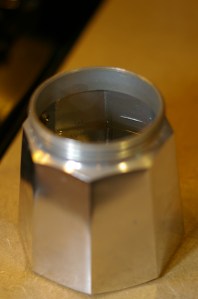
This is about where I fill to

This is about where I fill to

Next fill the coffee chamber with ground beans.  Experiment with different roasts/blends until you find what you like.  While I do sometimes splurge on locally micro-roasted single varietals, I do also find that Starbucks Verona or Espresso roast do well as daily drinkers.  Here is where my method of brewing differs from what I’ve read from various sources.  Most instructions will tell you not to pack or tamp the grinds down in the chamber. While I do not vigorously pack the grinds in, I do take the back of a tablespoon and gently apply some pressure to the beans in the chamber to smooth out the top layer.  If you are incapable of applying only a small amount of force, I’d just skip this step.
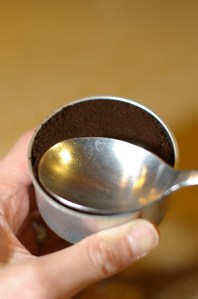
DO NOT press with much force... a gentle tamp will do.

DO NOT press with much force… a gentle tamp will do.

Lastly, I set the gas burner on our stove to medium-high, and wait for the magic to happen (the cook time will vary with your BTUs/the size and type of Moka pot, etc.,).  This is where there will have to be some trial and error on your part.  Also, the cooking procedure is where I’ve read different advice as well.  Some will say to set your burner on high, for example.  What I find is that, If I set the burner on medium-high, I have a greater amount of control over the very end of the cook, which is an important part of the process for me.  At medium-high, I can come back to the pot when the cook is almost finished and turn the burner off for the very last stages of the brew.  Turning off the heat stalls pressurization within the water chamber and allows the water vapor to push its way through the grinds with slightly less force at the end of the cook forming a pseudo-crema at the end of the cook.  This is in contrast to the forceful popping and gurgling you will experience if you keep the burner on high until the end.

My pseudo-crema...

My pseudo-crema…

Next, pour and enjoy!  Now, go out and make some great data analysis!
Slope graphs and exporting multi-paneled plots (with data) in R

I’ve been trying to carve out the time to write a post about the GooleVis package and, more specifically, how AWESOME motion charts are within GoogleVis, but in the mean-time, I’ve been spending a lot of time thinking about data visualizations. I think that the act of putting together an entry for Naomi Robbin’s Forbes Graph Challenge had this kind of an impact on my consciousness. Anyhow, a few early responders to Naomi’s post were discussing slope graphs (http://www.edwardtufte.com/bboard/q-and-a-fetch-msg?msg_id=0003nk) and it inspired me to seek out ways to incorporate these into some of my data presentations. I found a most excellent post here about producing them in R (http://www.jameskeirstead.ca/r/slopegraphs-in-r/).  I will look for ways to incorporate these where they make sense in any future reporting.

Also, my issue of the week involved putting together a report that did an analysis of 300+ therapeutic groupings, where for each grouping I had to work out a way to get both an informative plot AND multiple pieces of data (2 data frames) to export to a single image. I resolved my issue with some help from gplots textplot() function.

testMat <- matrix(1:20, ncol = 5)##  create data
testMatDF <- as.data.frame(testMat)
names(testMatDF) <- c("Hey there", "Column 2",
         "Some * Symbols", "And ^ More",
         "Final Column")
rownames(testMatDF) <- paste("Group", 1:4)

library(gplots) ##  gplots needed for textplot()
layout(matrix(c(1, 1, 2, 3, 3, 3),  2, 3, byrow = TRUE))
curve(dnorm, -3, 4)
textplot(testMat)
textplot(testMatDF)
##  produces what I want within R

png(file='plot1.png')
layout(matrix(c(1, 1, 2, 3, 3, 3),  2, 3, byrow = TRUE))
curve(dnorm, -3, 4)
textplot(testMat)
textplot(testMatDF)
dev.off() ##  how to export the same

Here’s a new years tip: This year resolve to get your resolution right when exporting plots in R

Winston Chang’s Cookbook for R (http://wiki.stdout.org/rcookbook/) has become one of my most favorite R reference sites as of late. In large part, this is because he does a most excellent job of providing some easily digestible ggplot examples, and I’ve been trying to make a move away from base to ggplot for all of my plotting needs.

While there are many very useful nuggets to be found in perusing his site, one useful tip I use every time I export a plot in R is this hint on adjusting the resolution of plots regardless of any device I’m printing to.

His code is found on this page (http://wiki.stdout.org/rcookbook/Graphs/Output%20to%20a%20file/), but in essence the gist of it all goes like this:

# First try it without adjusting the ppi
png("plot1.png")
plot(mtcars$wt, mtcars$mpg, main="Scatterplot w/o adjustment", xlab="Car Weight ", ylab="Miles Per Gallon ", pch=19)
attach(mtcars)
abline(lm(mpg~wt), col="red") # regression line (y~x) 
lines(lowess(wt,mpg), col="blue") # lowess line (x,y)
dev.off() 
#  Now try it with adjustment -- as you can see you have to feed the device output function the actual width and height
ppi <- 300
png("plot2.png", width=6*ppi, height=6*ppi, res=ppi)
plot(mtcars$wt, mtcars$mpg, main="Scatterplot w/adjustment", xlab="Car Weight ", ylab="Miles Per Gallon ", pch=19)
attach(mtcars)
abline(lm(mpg~wt), col="red") # regression line (y~x) 
lines(lowess(wt,mpg), col="blue") # lowess line (x,y)
dev.off() 

I’ve been having quite a bit of fun with bubble plots and the googleVis package recently. The googleVis package, for one, is absolutely MIND-BLOWING! I’m hoping to carve out the time to do a post about that sometime in the very near future!

looping with if (the importance of vector indices) to solve something that has plagued me for a while (shifting fill dates)

This week I toyed around with some code to shift fill dates for persistence analysis, and I think I’ve stumbled on a workable solution that involves an if loop and the use of vector indices.  It’s a synthesis of a few concepts that have been bouncing around in my head for quite some time.  The detritus setting into a more well-behaved gel thanks to some help from what I’ve managed to pick up from my ongoing exploration into the Matloff text I’m nibbling on.  The problem involves the shifting of the fill date for medication fills that overlap with the fill date + days supply of a previous fill (or fills).  This intermediate step is addressed in SAS code by Scott Leslie in this SUGI paper (http://www.wuss.org/proceedings11/Papers_Chu_L_74886.pdf).  The solution I’ve come up with is probably not as eloquent as it could be (as I’m sure there are some vectorization efficiencies to be had), but nonetheless, I offer it up here:

FD is the vector of fill dates

DS is the vector of days supplies

Also, you will note that for the funciton to work for an entire data.frame of subjects you have to use something like Hadley Wickhams’ plyr to execute the fuction by member in a transform ddply fashion.


shiftday <- function(FD,DS){
x <- rep(0, length(FD))
VA <- FD
VB <- DS
for (i in 1:length(VA))
 if (i == 1)    x[i] <- VA[i]
else {    if ((((x[i-1] + VB[i-1])) - VA[i]) <= 0)
 x[i] <- VA[i]
 if ((((x[i-1] + VB[i-1])) - VA[i]) > 0)
x[i] <- ((x[i-1] + VB[i-1])) - VA[i] +VA[i]   }
x
}

Unfortnately, the text formatting of WordPress are not friendly to displaying code (the missing indentations make the reading less-than-ideal), but you get the picture.

A helpful hint about the proper use of dcast

Yet another one of Hadley Wickhams packages that I’ve come to use to get me out of a bind from time-to-time has been rehsape2.  There are a number of helpful functions that deal with munging data into formats that allow for easier display/plotting/analysis.  The problem that I run into is that I’ll use one of the reshape functions in a project, then months later, I’ll forget the reshape2 syntax for a certain function and I’ll have to go looking to find my old code or a post that gets me back on the right track.

This is where I found myself this morning, stuck with a situation that I would usually use tapply to solve, and on the account of having >1 grouping factor, I had to get from A to Z using both summaryBy (doBy) followed by a reshape function (in this case it was dcast).  After some searching around, I found this most helpful post on stack overflow that got me going in the right direction.

http://stackoverflow.com/questions/9621401/aggregation-requires-fun-aggregate-length-used-as-default

The key piece of code is found below:

library(reshape2)

## A toy dataset, with one row for each combination of variables
d <- expand.grid(Hostname = letters[1:2],
                 Date = Sys.Date() + 0:1,
                 MetricType = LETTERS[3:4])
d$Value <- rnorm(seq_len(nrow(d)))

## A second dataset, in which one combination of variables is repeated
d2 <- rbind(d, d[1,])

## Runs without complaint
dcast(d, Hostname + Date ~ MetricType)
## note-if you have greater than 1 value variable you will need to declare value.var="MYVAR" or else will default aggregate to length()

## Throws error asking for an aggregation function
dcast(d2, Hostname + Date ~ MetricType)

## Happy again, with a supplied aggregation function
dcast(d2, Hostname + Date ~ MetricType, fun.aggregate=mean)

helpful tips on sampling from beta distributions (getting from a to b to means and modes)….

beta_mod95_alp40

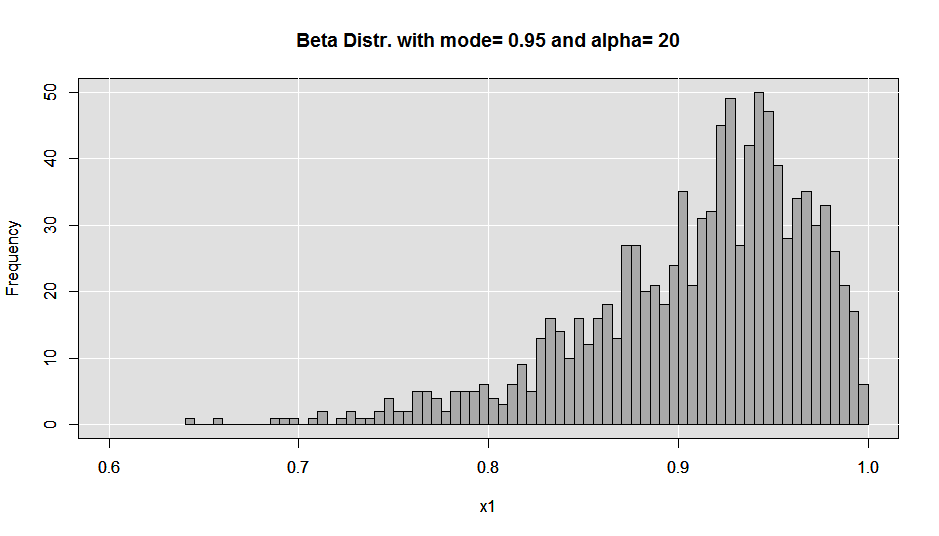
beta_mod95_alp20

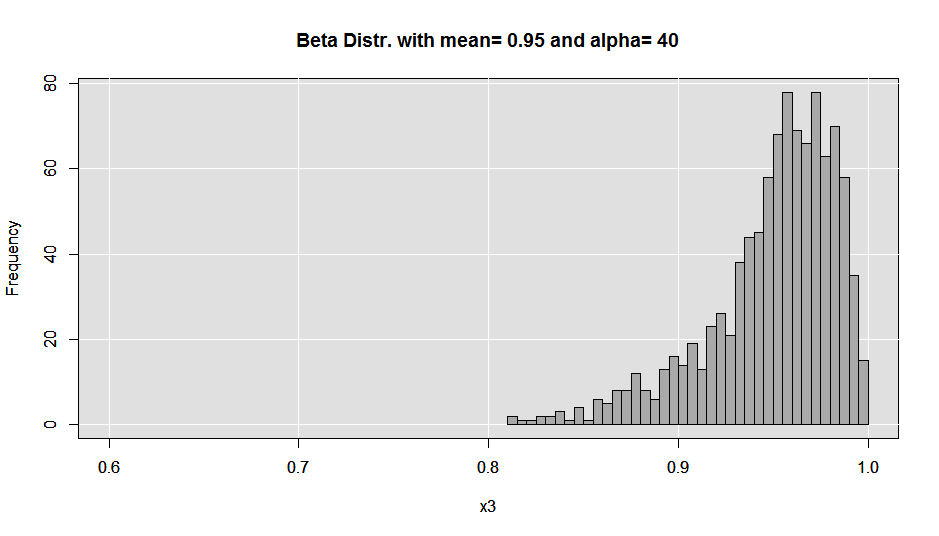
beta_mu95_alp40

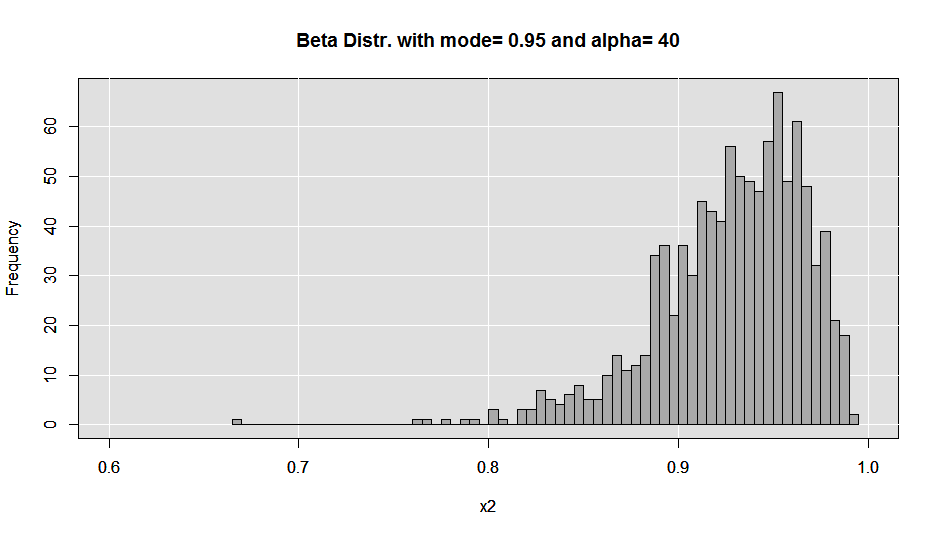
I’ve been playing around with using R for simulations recently, and I ran into a use case that required I sample from a skewed distribution with min and max values of 0 and 1.  A beta distribution was a nice representative form (http://en.wikipedia.org/wiki/Beta_distribution#Mode), and base R has a built in rbeta function; however, I needed to be able to feed into rbeta the proper alpha and beta parameters to produce the required distribution.  So, I created two simple R functions that allowed me to start with an alpha value (take your pick) and either a target mean or mode, and the function produced the appropriate beta that I could then use to produce a beta distribution and my random sample.

# first by mean
a1 <- 20
mu1 <- .95
solmean <- function(alpha, mean) (alpha-(mean*alpha))/mean
beta <- solmean(a1, mu1)
x1 <- (rbeta(1000, shape1=a1, shape2=beta)) # sample of n=1000 from the beta dist
head(x1)
x1 <- round(x1,3)
hist(x1, breaks=100)# let's give it a look
mean(x1)
x2 <- table(x1)
which.max(x2) # let's see what the mode is
quantile(x1) # more descriptives

#  Now by mode
a2 <- 20
mo1 <- .95
solmode <- function(alpha, mode) (alpha-1-(mode*alpha)+(2*mode))/mode
beta <- solmode(a2, mo1)
x1 <- (rbeta(1000, shape1=a2, shape2=beta)) # sample of n=1000 from the beta dist
head(x1)
x1 <- round(x1,3)
hist(x1, breaks=100)# let's give it a look
mean(x1)
x2 <- table(x1)
which.max(x2) # let's see what the mode is
quantile(x1) # more descriptives


## Here's the code I used to make the plots that are above:
set.seed(123)
#  Now by mode
a2 <- 20
mo1 <- .95
solmode <- function(alpha, mode) (alpha-1-(mode*alpha)+(2*mode))/mode
beta <- solmode(a2, mo1)
x1 <- (rbeta(1000, shape1=a2, shape2=beta)) # sample of n=1000 from the beta dist
head(x1)
x1 <- round(x1,3)
xlimits <- pretty(range(x1))[c(1,length(pretty(range(x1))))]
hist(x1, breaks=100, xlim=xlimits, main="")# let's give it a look
test <- (x1, breaks=100, xlim=xlimits, main="")
u <- par("usr")
rect(u[1], u[3], u[2], u[4], col = "gray88", border = "black")
abline(v = pretty((range(x1))), col='white') ## draw h lines
abline(h = pretty(test$counts), col='white') ## draw h lines
par(new=T)
hist(x1, breaks=100, xlim=xlimits, col='darkgrey', main=paste('Beta Distr. with mode=', mo1, 'and alpha=', a2))# let's give it a look

#  Now by mode
a2 <- 40
mo1 <- .95
solmode <- function(alpha, mode) (alpha-1-(mode*alpha)+(2*mode))/mode
beta <- solmode(a2, mo1)
x2 <- (rbeta(1000, shape1=a2, shape2=beta)) # sample of n=1000 from the beta dist
head(x2)
x2 <- round(x2,3)
hist(x2, breaks=50, xlim=xlimits, main="")# let's give it a look
test <- hist(x2, breaks=50, xlim=xlimits, main="")
u <- par("usr")
rect(u[1], u[3], u[2], u[4], col = "gray88", border = "black")
abline(v = pretty((range(x1))), col='white') ## draw h lines
abline(h = pretty(test$counts), col='white') ## draw h lines
par(new=T)
hist(x2, breaks=50, xlim=xlimits, col='darkgrey', main=paste('Beta Distr. with mode=', mo1, 'and alpha=', a2))# let's give it a look

#  Now by mean
a3 <- 40
mu1 <- .95
solmean <- function(alpha, mean) (alpha-(mean*alpha))/mean
beta <- solmean(a3, mu1)
x3 <- (rbeta(1000, shape1=a1, shape2=beta)) # sample of n=1000 from the beta dist
head(x3)
mean(x3)
x3 <- round(x3,3)
hist(x3, breaks=50, xlim=xlimits, main="")# let's give it a look
test <- hist(x3, breaks=50, xlim=xlimits, main="")
u <- par("usr")
rect(u[1], u[3], u[2], u[4], col = "gray88", border = "black")
abline(v = pretty((range(x1))), col='white') ## draw h lines
abline(h = pretty(test$counts), col='white') ## draw h lines
par(new=T)
hist(x3, breaks=50, xlim=xlimits, col='darkgrey', main=paste('Beta Distr. with mean=', mu1, 'and alpha=', a3))# let's give it a look

That’s it. I’ve noticed that changing your prespecified alpha does some interesting things to the kurtosis of the resulting beta distribution, but it’s up to you to play around with things until you get a distribution that suits your needs!

One last thing… if you are really into fat-tailed distributions (let’s say your a black swan fan), and you really don’t require a “curvy” form.  One great way to sample from a skewed distribution that is realtively easy to specify (in terms of a mode–that is), I’ve found that the triangle package (http://cran.r-project.org/web/packages/triangle/index.html) a nice way to go…. and the code is super easy to run.

 require(triange)
 tri <- round(rtriangle(10000, 0, 1, .85),3)  # just feed it the sample size, min bound, max bound, and mode... and voila!
 hist(tri)
 

ENJOY!

Some quick tips on upgrading R

I recently took the plunge to upgrade R to 2.15.  As I was pondering the best way to install all my favorite packages, I stumbled upon this very helpful post from HLPlab

http://hlplab.wordpress.com/2012/06/01/transferring-installed-packages-between-different-installations-of-r/

The post describes a very handy way of ensuring that all your favorite packages make it to your new install.  Basically this is done via a handy set of code, and involves: 1) saving the names of your packages to a location, and then 2) calling R to then install those packages by name into your new version.

The code with descriptions can be found below:

1. Run the script “store_packages.R” in your current version of R.

# store_packages.R # # stores a list of your currently installed packages

tmp = installed.packages()

installedpackages = as.vector(tmp[is.na(tmp[,"Priority"]), "Package"])

save(installedpackages, file="packagenames.rda")

Make sure that all the quotation marks in the script are straight.  The scripts will generate an error if they include any curly quotation marks.  For some reason, when I saved this blog entry, some quotation marks changed to curly ones.  WordPress is probably to blame for this problem, which I have not been able to fix.)

2. Close R.  Open the installation of R that you want the packages to be installed in.

3. Run the script “restore_packages.R”.

# restore_packages.R # # installs each package from the stored list of packages

load(“~/packagenames.rda”)

for (count in 1:length(installedpackages)) install.packages(installedpackages[count])

Note that if you want to install the list of packages in an installation of R on a different computer, you should transfer the .rda file that is created by the store_packages script to that computer, and make sure that the path for the “load” command in the restore_packages script is set to the right location.

However, for me, this all may change with my next upgrade–perhaps, as I chose the option to save my packages to a personal library (when 2.15 gave me the option) and my packages are now stored in a different location:

The downloaded binary packages are in
C:\Users\Chris\AppData\Local\Temp\RtmpiCX9N6\downloaded_packages

Time to take my charting to the z-rd dimension–bubble plots and heatmaps

I’ve been really trying to take my data visualization skills to the next level.  Some outlets I’ve been experimenting with include: heatmaps and bubble plots. 

In working with heatmaps, the data I’ve been visualizing includes trends of things like monthly utilization and such, where it is important for the consumer to absorb trends, and relative values.  While I am still in search of good step-by-step tutorials and texts to help me along down that path–I’ve found Chapter 8 of Hrishi V. Mittal’s R Graph Cookbook a decent source in this regard (http://www.amazon.com/R-Graph-Cookbook-Hrishi-Mittal/dp/1849513066).  In addition, the flowing data blog has a most excellent step-by-step (the consiceness and clarity of that blog, just nudged me to reward his work with a purchase of his text at amazon- http://www.amazon.com/Visualize-This-FlowingData-Visualization-ebook/dp/B005CCT19M/ref=kinw_dp_ke).

With bubble charts, it’s all about going beyond visualizing a table of numbers and truly visualizing the relationships of three separate elements of quantification.  For my needs it would be something like what were total sales last year, this year (in dollars) and total utiliation this year (in units) OR over the last year, what are total sales ($), how many unique members were using, and what is utilization in total claims.  In terms of bubble charts, I’ve found an excellent step-by-step–also from the Flowing Data blog (http://flowingdata.com/2010/11/23/how-to-make-bubble-charts/), which I intend to give a whack today!

…on to take my plotting to z-rd base!

Ground control to Major Tom… to MARS and earth and back…

I’ve finished Matloff’s excellent R book, and I’m now wading through some books on using R for Bayesian inference and trying to get handle on machine learning with R in a catch-as-catch can kind of a way (with some help from Conway’s O’Reilly text: http://www.amazon.com/Machine-Learning-Hackers-Drew-Conway/dp/1449303714).

One of the machine learning methods that has really captured my interest as of late–which unfortunately is not expicitly addressed in Conway’s book–is MARS (which I’ve come to learn is now a term “owned” by Salford Systems–but stands for Multivariate adaptive regression splines http://en.wikipedia.org/wiki/Multivariate_adaptive_regression_splines). As someone who has used quite a bit of MLR, MARS represents a really cool extension in that it creates inflection points (splines) in linear functions to optimize model fit.

In medicine, where heterogineity of patient populations can manifest as different treatment effects (based on underlying demographic, behavioral, or genetic characteristics), this method of modeling data seems really appaealing. I can see how knot placment, in-and-of-itself, may lend some interesting insights as to how subpopulations may gain differential relative benefit from medications or other kinds of interventions!.. which may lead to a better unerstanding of what interventions bring the highest value for target sub-populations!

That said, I’m looking forward to applying MARS to a future project.

As far as I can tell the R package that implements MARS is called earth, and I have began to browse through the manuals available on CRAN (http://cran.r-project.org/web/packages/earth/index.html). Fun stuff indeed….

Why you should try to use tapply, vs. summaryBy

I was reviewing a helpful blog post regarding tapply (http://www.sigmafield.org/2009/09/20/r-function-of-the-day-tapply/), when I got hit with a thought: Should I be using tapply in cases where I use summaryBy?

In much of my data manipulation and munging, I find that I actually use the summaryBy function of the doBy package quite a bit. One of the downsides to summaryBy, that I find, is that it can be quite slow. So, coming back to my thought on tapply. What I have come to realize is that the closer you get to sticking to base functions, the faster your code will run (generally). So, knowing that tapply is a base R function, I decided to run a speed test on a dataframe that has roughly 1.6MM observations in it to see what the performance differnece might be. Below are my results:


system.time(tapply(elig$Eligibility.Date, elig[c("Eligibility.Date", "form")], FUN=length))
user system elapsed
45.34 0.00 45.39
system.time(summaryBy(~Eligibility.Date+form, data=elig, FUN=length))
user system elapsed
151.97 0.03 152.33

As you can see tapply runs over 3x as fast! In additon, the format of the output is more satisfactory to my particular application of these data. So, bottom line, try to stick with base functions when possible, and before going to summaryBy, try tapply.